
Grounding LLMs: How Function Calling Makes AI Actionable

On 30 November 2022, ChatGPT was introduced by OpenAI, taking the world by storm. Few expected a machine to produce words that seemed so human. But after the first few days, as things kept unfolding, people quickly started to realise that these tools were initially mostly good for amusement, while perhaps showing a glimmer of potential for what might come next.
What is Function Calling?
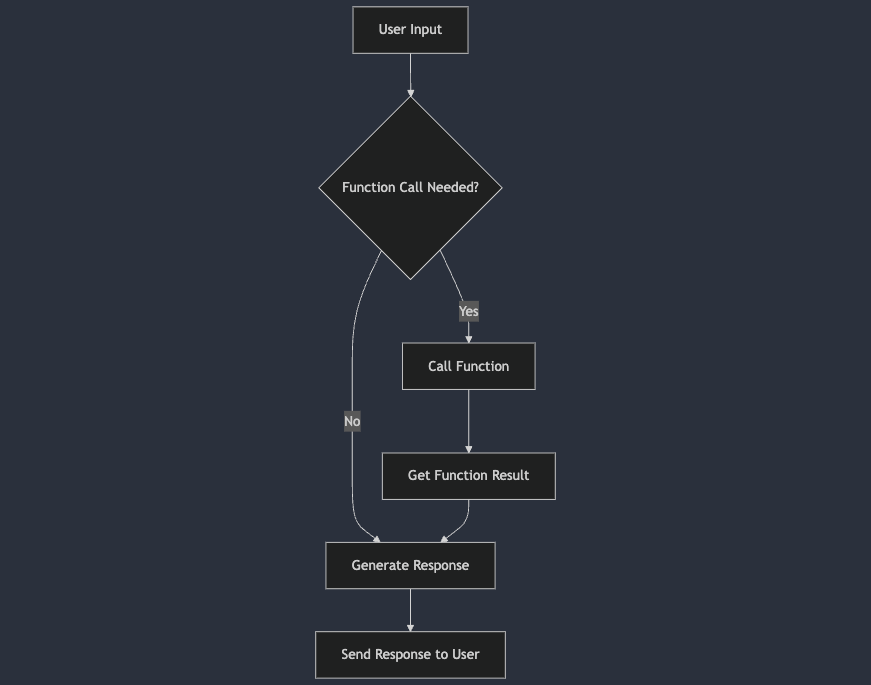
Function calling is the capability of AI language models to recognize when a user's request requires external data or actions, and to invoke the appropriate functions or APIs to fulfill that request. This feature bridges the gap between understanding natural language and executing tasks, enabling AI assistants to perform actions like data retrieval, command execution, or information manipulation based on user input. In essence, it transforms AI from a passive responder into an active participant in accomplishing tasks.
Why is This Such a Game Changer?
Finally, there's a way for LLMs to quit yapping and interact with the world, It means that now an LLM is not only going to produce text but maybe search the internet, delete an email, or do any action we define and allow. It's finally the moment an LLM can interact with the world.
Examples:
- Advanced Retrieval-Augmented Generation (RAG) Systems: The LLM can decide which documents to use, if any, enhancing the accuracy of information retrieval.
- Customer Service Agents: Now they are able to unblock accounts and truly help users, similar to human agents.
- Automation: We can unleash LLMs on our data to allow them to automate work that we didn't think was possible before.
How Does Function Calling Work?
At its core, function calling allows the language model to output a structured function call when it recognizes that a certain function should be invoked. We need to define a set of functions along with their parameters, and the model decides when and how to use them based on the user's input.
For example, if you ask:
"What's the weather like in Paris tomorrow?"
The LLM can generate a function call like:
{
  "function": "getWeather",
  "parameters": {
    "location": "Paris",
    "date": "tomorrow"
  }
}
We parse the output and match it to existing function getWeather which will then fetches the data, and the LLM presents it to you in a natural, conversational way:
"The weather in Paris tomorrow will be partly cloudy with a high of 22°C."
Getting Started with an Email Filtering System
Let's dive into a practical example to see function calling in action. We'll create a simple email filtering system using an LLM that can:
- Archive any email it identifies as an advertisement.
- Star any email that is personal or work-related.
Overview
We'll simulate an email assistant that processes incoming emails and decides whether to archive or star them based on their content. We'll define two functions, archive_email and star_email, and use the LLM to determine which function to call for each email.
Setting Up the Environment
First, ensure you have the necessary packages installed:
pip install openai
Defining the backend Functions
We'll define the functions that perform the actions, these are the functions that will be executed according to the LLM's output, for simplicity's sake we will keep these as dummy functions.
def archive_email(email):
    # Simulate archiving an email
    print(f"Archiving email: {email['subject']}")

def star_email(email):
    # Simulate starring an email
    print(f"Starring email: {email['subject']}")
Preparing the LLM & Function definitions
We'll use OpenAI's GPT-4 model with function calling capabilities. We'll define the functions the model can call:
import openai

openai.api_key = 'YOUR_API_KEY'

functions = [
    {
        "name": "archive_email",
        "description": "Archive an email identified as an advertisement.",
        "parameters": {
            "type": "object",
            "properties": {
                "email_id": {"type": "string", "description": "The unique ID of the email."},
            },
            "required": ["email_id"],
        },
    },
    {
        "name": "star_email",
        "description": "Star an email that is personal or work-related.",
        "parameters": {
            "type": "object",
            "properties": {
                "email_id": {"type": "string", "description": "The unique ID of the email."},
            },
            "required": ["email_id"],
        },
    },
]
Step 1: main prompt
this is the prompt that would govern the LLM's behaviour, it's also useful to explain in the main prompt that it's required to perform actions.
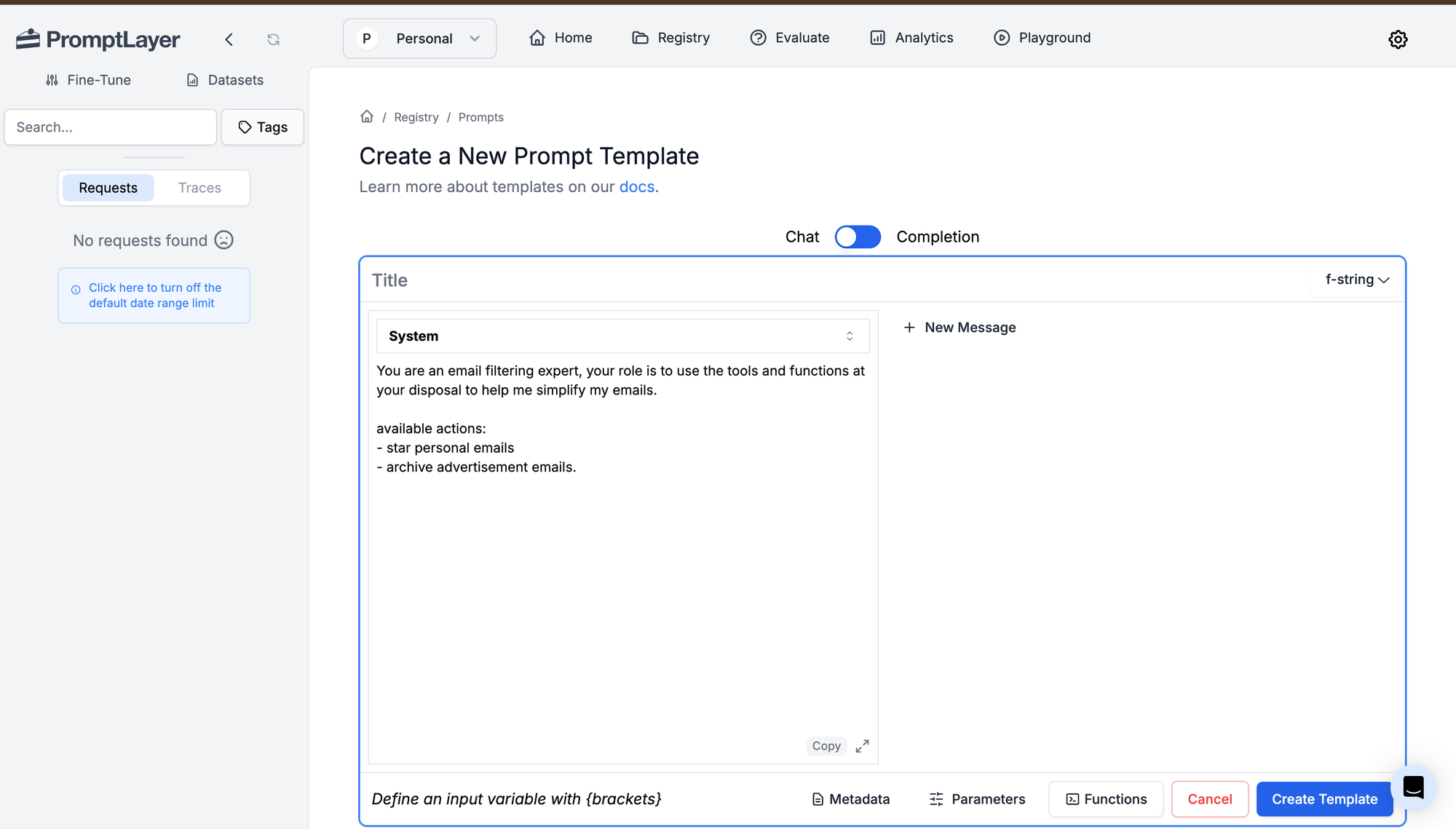
You are an email filtering expert, your role is to use the tools and functions at your disposal to help me simplify my emails.

available actions:
- star personal emails
- archive advertisement emails.
Step 2: defining functions
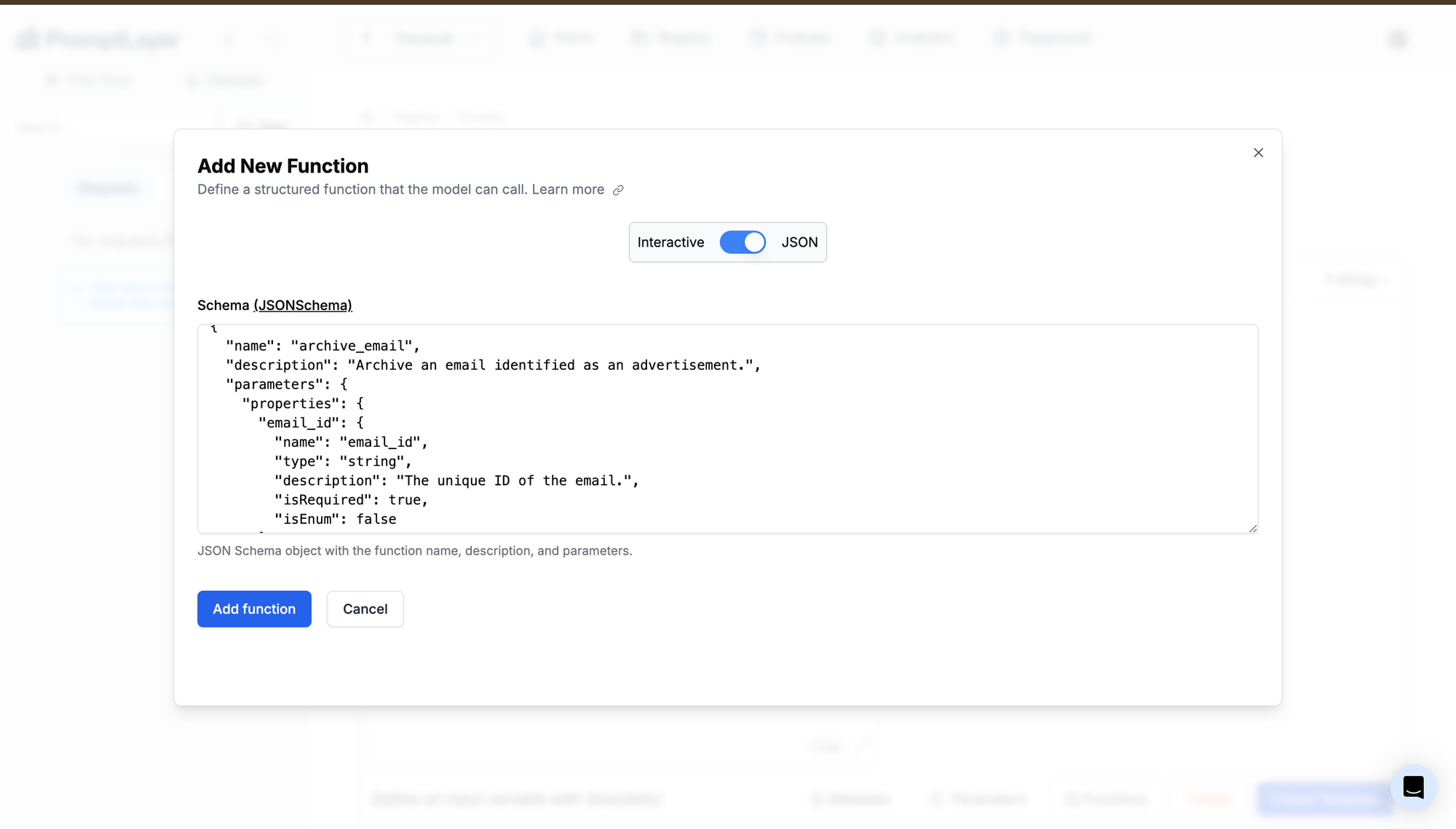
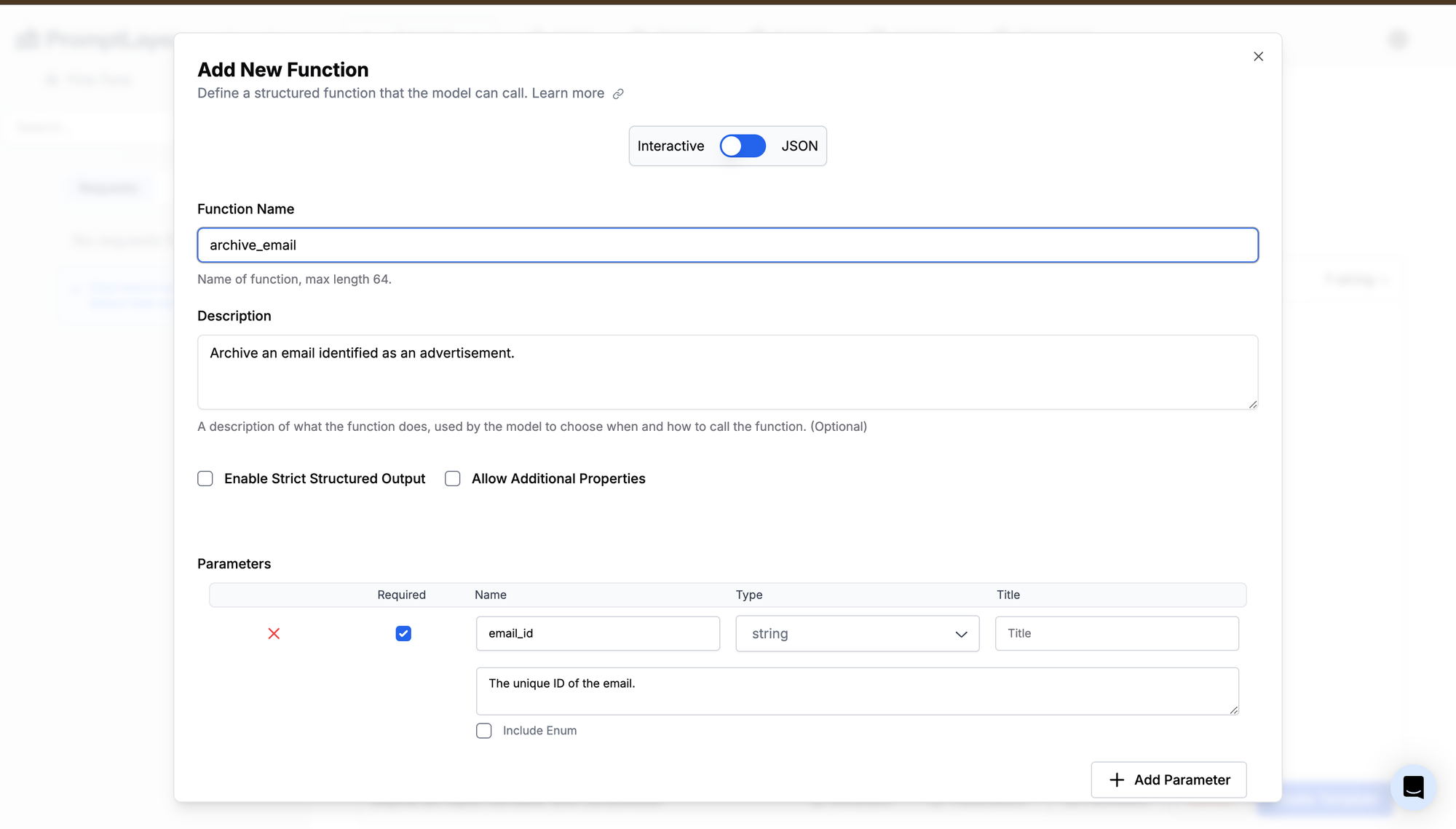
here we define the functions, using PromptLayer we can define the function both as a json or filling in the fields, most importantly we need to define the following components:
- description: this is the function description that will be considered by the LLM therefore it needs to be accurately describing when to use the function
- Parameters: the function parameters that will be passed to the LLM these also are better to be clearly written and clearly described for best results
Email Example Dataset
here we are going to create an example email dataset to test that our system is performing the expected action
emails = [
    {
        "id": "email_1",
        "from": "promo@bestbuy.com",
        "subject": "Exclusive Deal Just for You!",
        "body": """Hi there,

We're excited to offer you an exclusive deal on the latest electronics. For a limited time, get up to 50% off on select items.

Don't miss out!

Best regards,
The Best Buy Team""",
    },
    {
        "id": "email_2",
        "from": "sarah.johnson@company.com",
        "subject": "Quarterly Report Review Meeting",
        "body": """Dear Team,

This is a reminder for our quarterly report review meeting scheduled for next Monday at 2 PM in Conference Room B.

Please come prepared with your department updates.

Best,
Sarah Johnson
Director of Operations""",
    },
    {
        "id": "email_3",
        "from": "michael.brown@gmail.com",
        "subject": "Family Reunion Plans",
        "body": """Hello Family,

I'm organizing a family reunion for the holidays. Let's decide on a date and location that works for everyone.

Looking forward to seeing you all!

Cheers,
Michael""",
    },
    {
        "id": "email_4",
        "from": "newsletter@fitnessclub.com",
        "subject": "Your Weekly Fitness Tips",
        "body": """Hey Fitness Enthusiast,

Here are your weekly fitness tips to keep you motivated and on track.

Stay healthy!

Best,
The Fitness Club Team""",
    },
    {
        "id": "email_5",
        "from": "jessica.lee@university.edu",
        "subject": "Upcoming Alumni Event Invitation",
        "body": """Dear Alumni,

We are pleased to invite you to the upcoming alumni networking event. Join us for an evening of reconnecting and opportunities.

Warm regards,
Jessica Lee
Alumni Relations Coordinator""",
    },
]
Running example on PromptLayer
in here we can see the example for the first email as
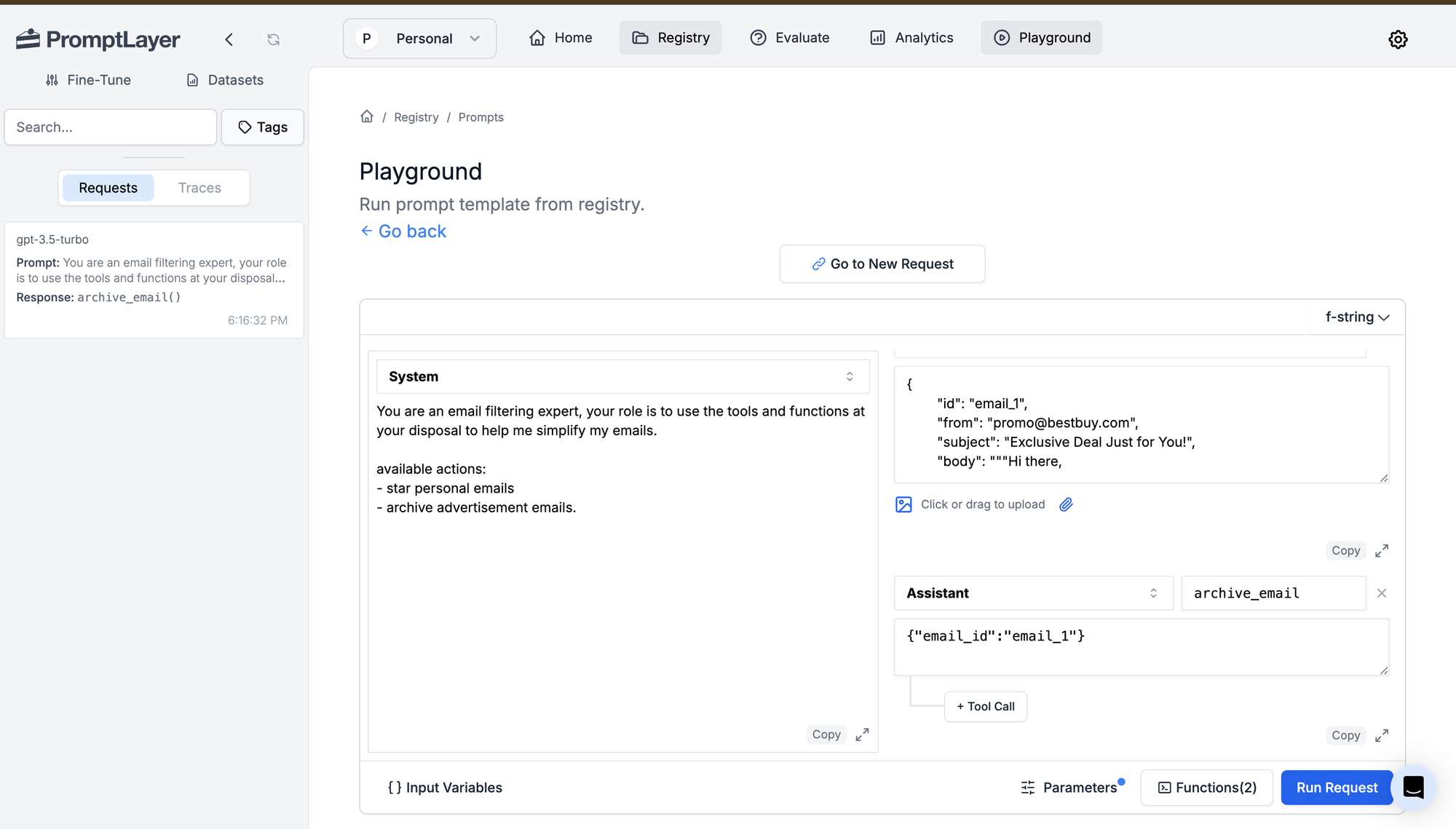
You can see here that it has successfully archived the promotion email!
Running example programmatically
We'll process each email using the LLM:
for email in emails:
    user_prompt = f"""
You are an email filtering expert, your role is to use the tools and functions at your disposal to help me simplify my emails.

available actions:
- star personal emails
- archive advertisement emails.
"""

    response = openai.ChatCompletion.create(
        model="gpt-4o",
        messages=[{"role": "user", "content": user_prompt}],
        functions=functions,
        function_call="auto",
    )

    message = response['choices'][0]['message']

    if message.get("function_call"):
        function_name = message["function_call"]["name"]
        arguments = message["function_call"]["arguments"]

        if function_name == "archive_email":
            archive_email(email)
        elif function_name == "star_email":
            star_email(email)
    else:
        print(f"No action needed for email: {email['subject']}")
The Output
When you run the script, you should see:
Archiving email from promo@bestbuy.com: Exclusive Deal Just for You!
Starring email from sarah.johnson@company.com: Quarterly Report Review Meeting
Starring email from michael.brown@gmail.com: Family Reunion Plans
Archiving email from newsletter@fitnessclub.com: Your Weekly Fitness Tips
Starring email from jessica.lee@university.edu: Upcoming Alumni Event Invitation
Putting it all together
import openai
import json

openai.api_key = 'YOUR_API_KEY'

def archive_email(email):
    # Simulate archiving an email
    print(f"Archiving email from {email['from']}: {email['subject']}")

def star_email(email):
    # Simulate starring an email
    print(f"Starring email from {email['from']}: {email['subject']}")

functions = [
    {
        "name": "archive_email",
        "description": "Archive an email identified as an advertisement or promotional content.",
        "parameters": {
            "type": "object",
            "properties": {
                "email_id": {"type": "string", "description": "The unique ID of the email to archive."},
            },
            "required": ["email_id"],
        },
    },
    {
        "name": "star_email",
        "description": "Star an email that is personal or work-related.",
        "parameters": {
            "type": "object",
            "properties": {
                "email_id": {"type": "string", "description": "The unique ID of the email to star."},
            },
            "required": ["email_id"],
        },
    },
]

emails = [
    {
        "id": "email_1",
        "from": "promo@bestbuy.com",
        "subject": "Exclusive Deal Just for You!",
        "body": """Hi there,

We're excited to offer you an exclusive deal on the latest electronics. For a limited time, get up to 50% off on select items.

Don't miss out!

Best regards,
The Best Buy Team""",
    },
    {
        "id": "email_2",
        "from": "sarah.johnson@company.com",
        "subject": "Quarterly Report Review Meeting",
        "body": """Dear Team,

This is a reminder for our quarterly report review meeting scheduled for next Monday at 2 PM in Conference Room B.

Please come prepared with your department updates.

Best,
Sarah Johnson
Director of Operations""",
    },
    {
        "id": "email_3",
        "from": "michael.brown@gmail.com",
        "subject": "Family Reunion Plans",
        "body": """Hello Family,

I'm organizing a family reunion for the holidays. Let's decide on a date and location that works for everyone.

Looking forward to seeing you all!

Cheers,
Michael""",
    },
    {
        "id": "email_4",
        "from": "newsletter@fitnessclub.com",
        "subject": "Your Weekly Fitness Tips",
        "body": """Hey Fitness Enthusiast,

Here are your weekly fitness tips to keep you motivated and on track.

Stay healthy!

Best,
The Fitness Club Team""",
    },
    {
        "id": "email_5",
        "from": "jessica.lee@university.edu",
        "subject": "Upcoming Alumni Event Invitation",
        "body": """Dear Alumni,

We are pleased to invite you to the upcoming alumni networking event. Join us for an evening of reconnecting and opportunities.

Warm regards,
Jessica Lee
Alumni Relations Coordinator""",
    },
]

for email in emails:
    user_prompt = f"""Decide whether to archive or star the following email:

From: {email['from']}
Subject: {email['subject']}
Body: {email['body']}

Provide the appropriate function call to perform the action."""

    response = openai.ChatCompletion.create(
        model="gpt-4-0613",
        messages=[{"role": "user", "content": user_prompt}],
        functions=functions,
        function_call="auto",
    )

    message = response['choices'][0]['message']

    if message.get("function_call"):
        function_name = message["function_call"]["name"]
        arguments = json.loads(message["function_call"]["arguments"])
        email_id = arguments.get("email_id")

        # Find the email by ID
        email_to_process = next((e for e in emails if e['id'] == email_id), None)

        if function_name == "archive_email":
            archive_email(email_to_process)
        elif function_name == "star_email":
            star_email(email_to_process)
    else:
        print(f"No action needed for email from {email['from']}: {email['subject']}")
Conclusion
Function calling in LLMs is more than just a technical feature—it's a transformative leap that turns AI models from passive text generators into active, task-oriented assistants. By enabling models to recognize when to invoke specific functions based on user input, we bridge the gap between understanding and action. This capability empowers developers and users alike to harness AI in ways that were previously unattainable.
In this post, we've explored what function calling is and why it's a game changer. We delved into the required components for implementing function calling and walked through a practical example of an email filtering system. This example demonstrated how an LLM could process emails and decide whether to archive or star them, showcasing the potential for automating routine tasks.