GPT-5 vs. GPT-5 Pro vs. GPT-5 “Thinking Mode”: Features, Capabilities & Differences

The release of GPT-5 has shifted the landscape of generative AI. Unlike previous iterations where a single model attempted to be everything to everyone, GPT-5 operates as a unified system equipped with a "real-time router." This dynamic architecture automatically switches between lightning-fast recall and deep, methodical reasoning depending on the complexity of your request.
Users have described this new dynamic as the AI having "two brains": one designed for quick, conversational reflexes, and another for heavy-duty problem solving. For developers and power users, this introduces a new layer of strategy. Understanding the trade-offs between speed, cost, and "chain-of-thought" reasoning is now essential for using OpenAI’s latest tools effectively.
Here is a detailed breakdown of the differences between the Base model, Thinking Mode, and the research-grade GPT-5 Pro.
GPT-5 Base & Auto Mode: The Everyday Workhorse
For the vast majority of queries, the standard GPT-5 running in "Auto Mode" is the default experience. It is designed to be the "fast, lightweight" option, handling casual conversation, brainstorming, and simple factual queries with near-instant latency.
Auto-Pilot Functionality
The defining feature of the base experience is the Auto Mode router. When you type a prompt, the system analyzes the complexity of the request in milliseconds. If the query is straightforward (e.g., "Draft an email to my team"), it routes to the fast inference engine. If the query is ambiguous or slightly complex, it may trigger a light version of reasoning.
Safety and Personality
OpenAI has addressed early complaints about "dry" or "robotic" responses by introducing customizable personas. Users can toggle settings to make the AI sound like a "Cynic," "Nerd," or "Listener." Furthermore, the model features improved "safe completions." Instead of bluntly refusing sensitive or borderline queries, the Base model attempts to guide users toward a helpful answer within safety boundaries, significantly reducing frustration.
Thinking Mode: Deep Reasoning on Demand
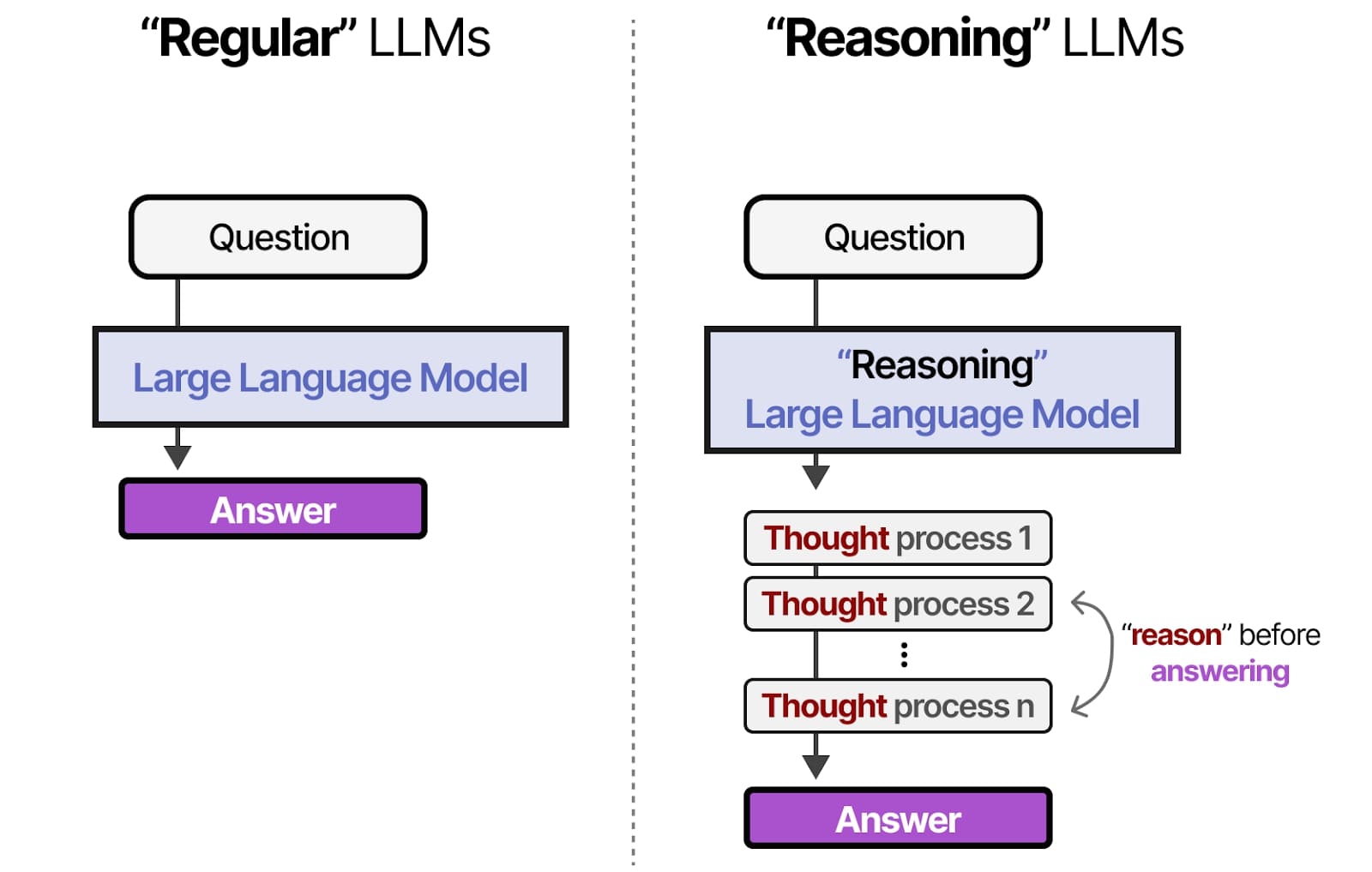
When the Auto router detects a complex logic puzzle, or when a user manually toggles the setting, GPT-5 enters "Thinking Mode." This is where the architecture shifts from pattern matching to genuine problem-solving.
Chain-of-Thought Processing
In this mode, the model "shows its work" internally. Before generating a single word of the final response, it breaks the problem down into logical steps, critiques its own assumptions, and plans a path to the solution. This process causes a noticeable delay—responses can take anywhere from several seconds to over a minute to begin streaming.
Accuracy Gains
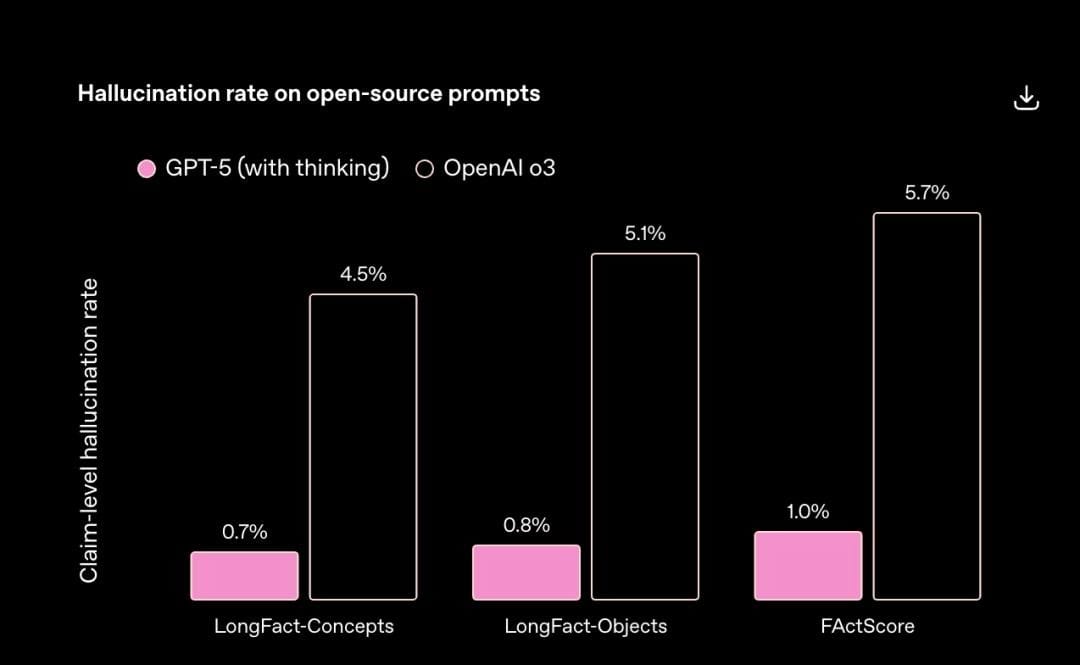
The trade-off for the delay is a massive boost in reliability. Research indicates that Thinking Mode produces up to 80% fewer factual errors compared to older models.
It excels at:
- Complex Mathematics: Solving multi-step word problems without dropping variables.
- Code Debugging: Tracing logic errors across multiple functions.
- Legal/Medical Analysis: Synthesizing information where "hallucination" is not an option.
Users describe the experience as "slower but smarter," noting that the model feels less like a chatbot and more like a deliberate analyst.
GPT-5 Pro: Research-Grade Power
Sitting at the top of the hierarchy is GPT-5 Pro, a mode designed for mission-critical tasks where time and cost are secondary to perfection. This is the "expert-level" tier that utilizes maximum compute power.
Maximum Compute and Parallel Processing
While Thinking Mode is linear, GPT-5 Pro utilizes parallel processing. It can run multiple reasoning threads simultaneously to explore different hypotheses before converging on the best answer. It is also capable of "agentic" behaviors, such as spawning multiple background search queries or tool calls at once to synthesize comprehensive reports.
Performance Delta
Benchmarks show that GPT-5 Pro makes approximately 22% fewer major errors than even the standard Thinking Mode on the hardest tasks (such as PhD-level science questions). It is designed for enterprise data analysis, production code generation, and scenarios where a single mistake could be costly.
Comparative Breakdown: When to Use Which?
With three distinct ways to interact with the model, choosing the right one depends on your specific goal.
- Everyday vs. Complex: Use Base/Fast for summaries, creative writing, and chat. Use Thinking Mode for logic puzzles, math, and fixing coding bugs.
- The "Pro" Threshold: Switch to Pro only for "research-grade" needs. If the standard Thinking mode hits a wall or misses subtle details in a massive document, Pro is the solution.
- Speed vs. Quality: Fast mode is instant; Thinking mode is methodical; Pro mode is exhaustive (and the slowest).
Optimizing Your Workflow
For developers building applications on top of these models, managing the trade-offs between cost and latency is critical. Tools like PromptLayer have become essential for experimenting with these different modes, tracking which prompts trigger the "Thinking" router, and optimizing the spend between Base and Pro tiers. By analyzing historical request data, teams can determine exactly when the expensive "Pro" compute is necessary versus when the Base model suffices.
Pricing and Access Tiers
Access to these capabilities is segmented by subscription level:
- ChatGPT Plus ($20/mo): Includes the Base GPT-5 model and limited access to Thinking Mode. Usage is metered to prevent system overload, meaning heavy users may be throttled back to the Base model after a certain number of "deep thought" queries.
- ChatGPT Pro ($200/mo): This tier unlocks unlimited "Pro" mode reasoning, priority capacity, and the maximum 128k token context window in the UI. It is aimed at power users who need the AI to act as a full-time research assistant.
- Team & Enterprise: "Team" plans offer a middle ground with capped Pro requests, while Enterprise offers custom limits and data privacy guarantees.
Putting GPT-5’s “Two Brains” to Work
GPT-5 is no longer a single “magic box” but a spectrum of effort: the base experience for speed, Thinking Mode for rigorous step-by-step analysis, and Pro when you’re willing to spend extra time and compute for research-grade answers.
The real upgrade isn’t just the models—it’s your ability to choose. Stop treating Auto as a black box: decide which of your tasks deserve deep thinking, which can live on fast mode, and which truly warrant Pro’s exhaustive passes.
If you’re building products or processes on top of GPT-5, start mapping use cases to these tiers, measure cost and latency, and iterate on your routing strategy. The people and teams who learn to “drive” the router intentionally will get far more out of GPT-5 than those who simply let it guess.