GitHub Copilot vs Cursor: Navigating AI-Powered Coding Assistants

The rise of AI-driven coding assistants like GitHub Copilot and Cursor is reshaping developer productivity. These tools promise to streamline coding through intelligent suggestions, automated refactoring, and natural language interactions. As teams evaluate which AI assistant to adopt, understanding the key differences between GitHub Copilot and Cursor becomes crucial for making an informed decision.
How Copilot and Cursor integrate into your setup
GitHub Copilot is an extension that integrates seamlessly into existing IDEs (VS Code, JetBrains, Visual Studio, Xcode). It's a simple plugin that minimally disrupts the familiar workflow.
Cursor, conversely, is a standalone, AI-native editor forked from VS Code. While the interface is familiar, adopting it means switching to a new application. It imports VS Code settings but uses the open VSX extension registry, meaning proprietary extensions, like official Microsoft tools, are unavailable.
For teams deeply embedded in the Microsoft ecosystem or those using specialized IDE extensions, this distinction matters. Copilot's plugin approach offers flexibility across multiple development environments, while Cursor's all-in-one design provides deeper AI integration throughout the entire editor experience.
Understanding the codebase
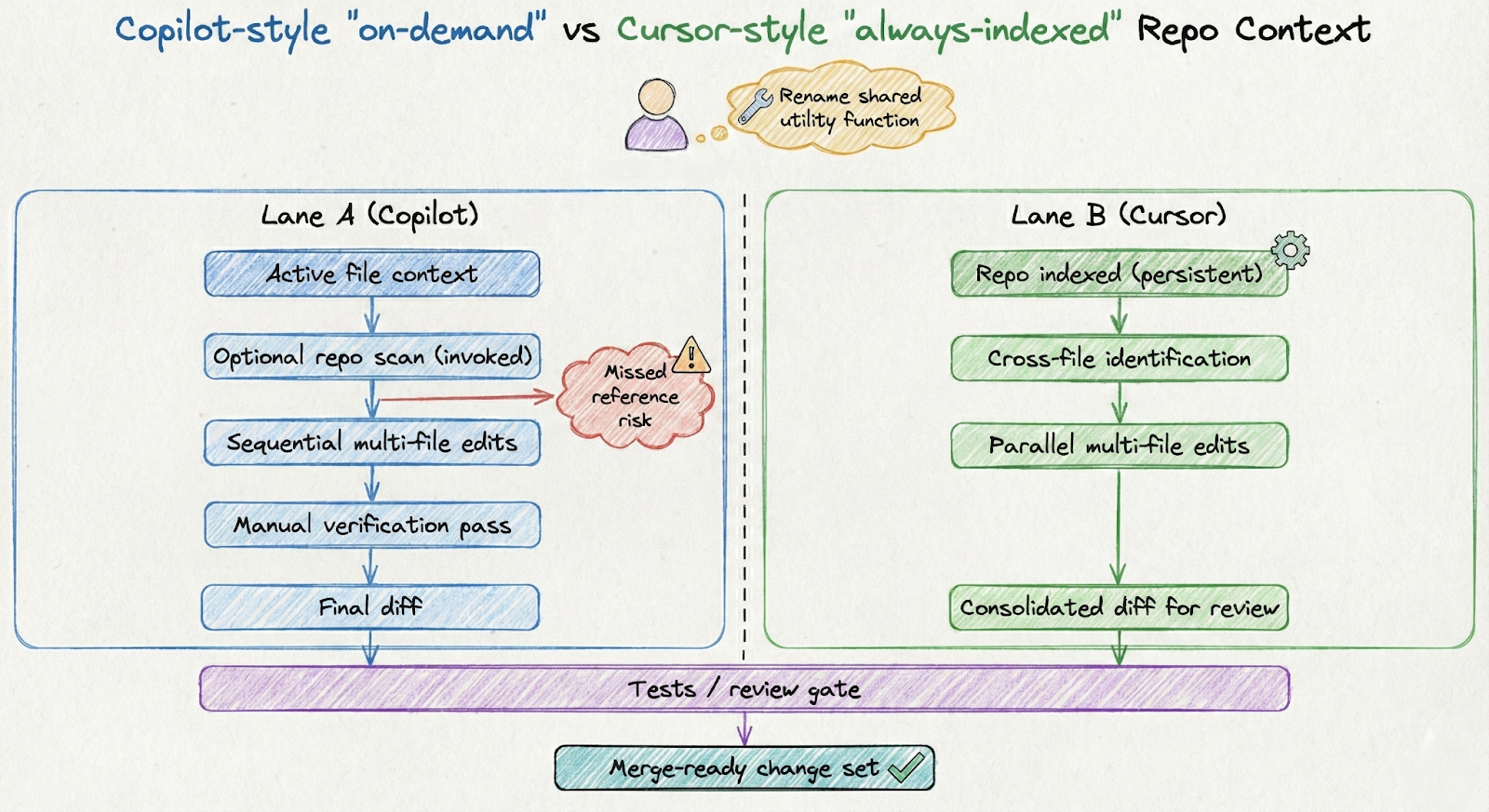
The core difference between GitHub Copilot and Cursor is their scope of code understanding:
GitHub Copilot focuses mainly on the active file and requires explicit commands (like @workspace or \\#codebase) to scan the rest of the project for broader context. Cursor is built on automatic, repository-wide understanding. It continuously indexes the entire codebase. This deep context allows Cursor to handle complex, project-wide refactoring (e.g., renaming a function across the whole project, including imports and documentation) instantly with a single natural language request, giving it a significant advantage in large codebases.
Choosing and shaping the model
GitHub Copilot automatically manages its AI models (from OpenAI, Anthropic, etc.), simplifying the user experience but locking users into GitHub's model choices. Cursor prioritizes model flexibility, allowing users to select from multiple providers like OpenAI, Anthropic's Claude, and Google's Gemini. Users can choose models based on task complexity (e.g., faster for autocomplete, powerful for refactoring) and can use their own API keys for potential cost savings or specific model needs.
This flexibility extends to advanced workflows. Cursor even allows model chaining, where different models handle different parts of a task. One model might analyze your code structure, another generates the implementation, and a third reviews the output for quality. For teams experimenting with AI workflows using tools like PromptLayer for prompt management and optimization, Cursor's open approach provides more control over the AI pipeline.
The trade-off is complexity. Copilot's managed approach means consistent performance without configuration headaches. Cursor's flexibility requires understanding different models' strengths and managing API costs if you bring your own keys.
How private your code really is
Privacy concerns around AI coding tools are legitimate - after all, these services process your source code. GitHub Copilot operates through GitHub's cloud infrastructure. Your code snippets and prompts travel to GitHub's servers for processing. For business and enterprise customers, GitHub promises that code and prompts aren't used to train their models. Individual users on free or standard plans have similar protections by default, though the policies have evolved over time.
GitHub has achieved SOC 2 Type II certification for Copilot and integrates with Microsoft's enterprise security framework. For organizations already using GitHub Enterprise Cloud, this fits naturally into existing compliance frameworks. However, the fundamental model remains cloud-based - your code must leave your machine for suggestions to work.
Cursor's Privacy Mode guarantees zero server-side data retention, meaning code is processed by the AI but not stored or used for training; all codebase indexing is local. It's default for business plans. Crucially, even with Privacy Mode and user-supplied API keys, requests still pass through Cursor's backend for prompt assembly, making Cursor an intermediary, not a fully local processor. This matters for teams with strict data residency needs.
Performance and Reliability
GitHub Copilot is a lightweight, responsive IDE extension, using about 380MB of RAM with most processing server-side. Inline suggestions are instant, making standard coding tasks smooth and reliable. However, its Agent Mode, used for larger, multi-file tasks like refactoring, is sequential, and the visible progress as it "types out" changes can feel slow for extensive modifications.
Cursor is faster for complex tasks due to its aggressive parallel processing (up to 8 agents), significantly outpacing Copilot's sequential processing. For example, Cursor's autocomplete responds in ~320ms versus Copilot's ~890ms, and sweeping refactors take seconds, not minutes. However, this speed demands more local resources, typically ~1.2GB of RAM compared to Copilot's 380MB, and its aggressive nature can sometimes result in changes needing extra review. For massive monorepos, some teams report indexing and memory struggles with Cursor.
The performance trade-off reflects each tool's design philosophy. Copilot optimizes for minimal resource usage and consistent suggestions. Cursor optimizes for speed and comprehensive changes, accepting higher resource requirements as the price for its capabilities.
Pricing and Plans
GitHub Copilot's pricing structure starts accessible. A free tier provides 2,000 completions monthly - enough for casual use or evaluation. The Individual Pro plan at $10/month (or $100/year) unlocks unlimited completions with premium models. For power users, a Pro+ tier at $39/month offers larger context windows and priority features.
Cursor is pricier, positioned as a premium tool. The Pro plan is $20/month, and the Ultra tier is $200/month for very heavy usage, tripling third-party model access. In mid-2024, Cursor faced controversy after changing its billing model to charge based on varying model usage, despite "unlimited" claims. The Teams plan is $40/user/month, with custom Enterprise pricing available.
The choice depends on usage: Copilot's $10 is good for occasional use; Cursor's $20-$40 may be worth the time savings for frequent, large-scale team refactors. The $200 Ultra tier is only practical for extremely high usage.
What to choose, depending on how you work
Choosing between GitHub Copilot and Cursor isn't about which tool is objectively better - it's about matching capabilities to your needs.
Choose GitHub Copilot when:
- You want minimal disruption to existing workflows
- Your team uses multiple IDEs or can't standardize on one editor
- You're already invested in the GitHub/Microsoft ecosystem
- Budget constraints make the $10/month price point attractive
- You primarily need help with single-file coding tasks
- Enterprise compliance requires specific certifications and indemnification
Choose Cursor when:
- Large-scale refactoring is a regular part of your workflow
- You work with complex codebases requiring deep contextual understanding
- Model flexibility and experimentation matter to your team
- Privacy Mode's zero-retention promise aligns with your security requirements
- The team is willing to adopt a new editor for productivity gains
- Budget allows for the higher price point
Some teams use both tools strategically. Developers might use Copilot for daily coding in their preferred IDE while switching to Cursor for major refactoring sessions. This hybrid approach maximizes each tool's strengths while managing costs.
Let your codebase decide
Both GitHub Copilot and Cursor are rapidly evolving, with Copilot adding Agent Mode and Cursor pushing AI editing boundaries. To decide, test both on a real refactor (e.g., renaming a symbol or changing an API) on your codebase, judging the diffs for correctness and completeness.
Copilot excels as an IDE-integrated assistant; Cursor shines as an editor treating the entire repo as the unit of work. Success requires good hygiene: understanding privacy, managing costs, and a mandatory review/testing loop.
The best immediate step is a two-week pilot using a scorecard (time saved, mistakes, resource hit, satisfaction) to let data and team tolerance dictate the choice.