Claude-code-spec-workflow

AI coding agents are revolutionizing software development, enabling more efficient workflows and faster iterations. However, without a structured approach, these agents can introduce costly regressions and unpredictable behaviors. For developers using Claude Code, embracing a spec-driven development (SDD) workflow is crucial to maximizing its benefits while minimizing potential challenges.
How Claude Code changes the way developers write code
Developed by Anthropic, Claude Code is a powerful AI coding agent that integrates seamlessly with your existing development environment. Its capabilities include CLI/SDK integrations, allowing for straightforward integration with developer tools like GitHub Actions. Claude Code acts as an intelligent assistant, analyzing your entire codebase, running commands, editing files, and integrating with tests and build processes. By embedding itself in the terminal or IDE, Claude Code can aid in transforming how developers write code, automate repetitive tasks, and maintain robust code quality.
Claude Code changes how you write code
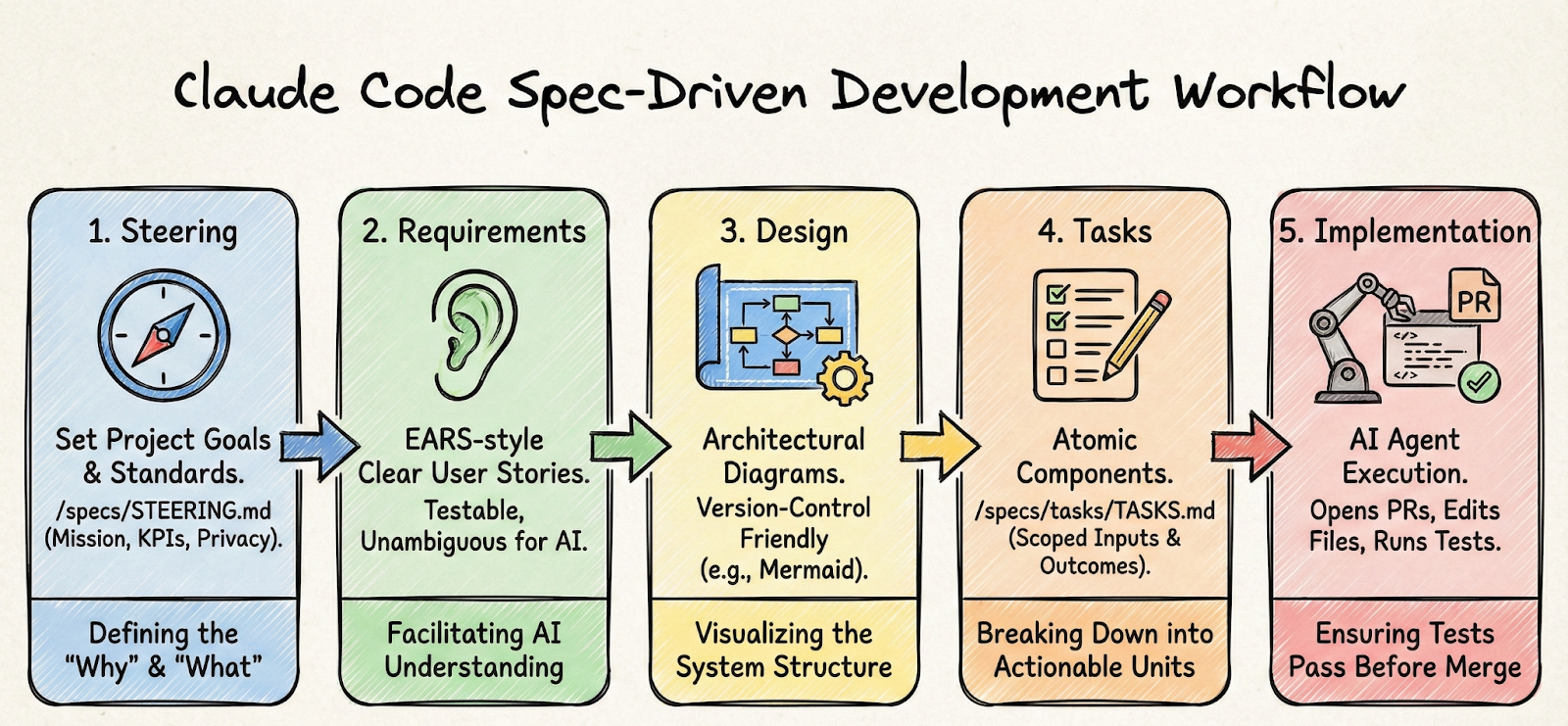
Spec-driven development involves methodically defining requirements and designs before diving into implementation. This approach can be broken down into specific stages: Steering, Requirements, Design, Tasks, and Implementation.
- Steering involves setting project goals and technical standards. Here, a file like /specs/STEERING.md comes into play, documenting the project mission, KPIs, and privacy constraints.
- Requirements employ tools like EARS to write clear, testable user stories. EARS (Easy Approach to Requirements Syntax) is a useful framework that facilitates writing unambiguous requirements by structuring them in a natural language that AI agents can easily interpret.
- Design focuses on architectural elements documented through diagrams, preferably using a version-control-friendly format like Mermaid.
- Tasks are broken down into atomic components documented in /specs/tasks/TASKS.md. Each task is scoped with defined inputs and expected outcomes.
- Implementation is where the agent runs through tasks, opening pull requests or editing files and ensuring all tests pass before any changes are merged.
Writing testable requirements with EARS and acceptance tests
Testable requirements are the cornerstone of a reliable SDD workflow. By using EARS, developers can write requirements that are easy to understand and translate into actionable tests. For instance, a requirement using the EARS pattern might state: "When the user logs in, they must see a personalized greeting." Such criteria can be paired with machine-readable contracts, ensuring that AI agents like Claude Code can enforce these rules during development.
Seeing what your prompts are really doing
Observability is crucial in making AI-driven code generation auditable and optimizable. Platforms like PromptLayer can assist with this by tracking important metrics such as prompt drift and latency, which provides insights into the operational efficiency of your AI prompts. Integrating PromptLayer with Claude Code allows for detailed tracking of how prompts perform during execution, helping to identify areas for optimization and ensuring that model updates don't compromise code quality.
Putting the workflow into place
Implementing an SDD workflow with Claude Code involves several key steps:
- Create a /specs folder to house steering docs, user stories, and design diagrams.
- Utilize machine-readable contracts, such as OpenAPI or JSON Schema, to guide agent behavior.
- Write tasks in /specs/tasks/TASKS.md, ensuring each task is testable and mapped to specific files.
- Configure agent permissions carefully with files like AGENT-CONFIG.md to maintain control over what the agent can execute.
- Monitor CI processes closely, requiring that spec-derived tests pass before merges, while logging prompt executions via tools like PromptLayer.
├───.github
│   └───prompts
│           plan.prompt.md
│           specify.prompt.md
│           tasks.prompt.md
│
└───.specify
    ├───memory
    │       constitution.md
    │       constitution_update_checklist.md
    │
    ├───scripts
    │   └───powershell
    │           check-task-prerequisites.ps1
    │           common.ps1
    │           create-new-feature.ps1
    │           get-feature-paths.ps1
    │           setup-plan.ps1
    │           update-agent-context.ps1
    │
    └───templates
            agent-file-template.md
            plan-template.md
            spec-template.md
            tasks-template.md
The system gets better after failure
Effective software development is iterative. When a bug arises, it's vital to document the issue, reproduce it reliably, and implement a fix that is followed by thorough testing. This bug-fix loop ensures that problems are addressed systematically and that valuable lessons are documented to prevent future occurrences. As with any tool, practitioners must be aware of the potential risks linked to Claude Code, such as model/version changes and data privacy issues. Strategies to handle these risks include careful version control of models, establishing clear agent permissions, and ensuring compliance with data governance standards.
Spending time to save time
Claude Code can move fast - but speed without a contract is just a quieter way to create regressions. Spec-driven development turns an AI agent from “helpful autocomplete” into an accountable teammate: clear steering docs, EARS-style acceptance criteria, machine-readable contracts, and tests that CI enforces every single time.
If you do one thing this week, make it concrete: add a versioned /specs folder, write one EARS requirement with an acceptance test that goes red/green, and wire prompt/run logging (via PromptLayer) into CI. Then let Claude Code execute task-by-task inside those guardrails. You won’t just ship faster - you’ll ship repeatedly.